How to use an iPhone over Ethernet
Okay, you're not really doing iPhone directly over Ethernet, and you'll need a Mac close by to do it, but this is a trick I find handy in hotels that offer wired ethernet for free, but where they charge for WiFi (like Marriott Changfeng Park in Shanghai).
Set up your Mac (I use a MacBook Pro) to do internet sharing over Airport, and you can become your own WiFi hotspot, easily connected to from your iPhone or iPad.
Under System Preferences (available under the apple menu), under "Internet and Wireless", select Sharing, and do this:
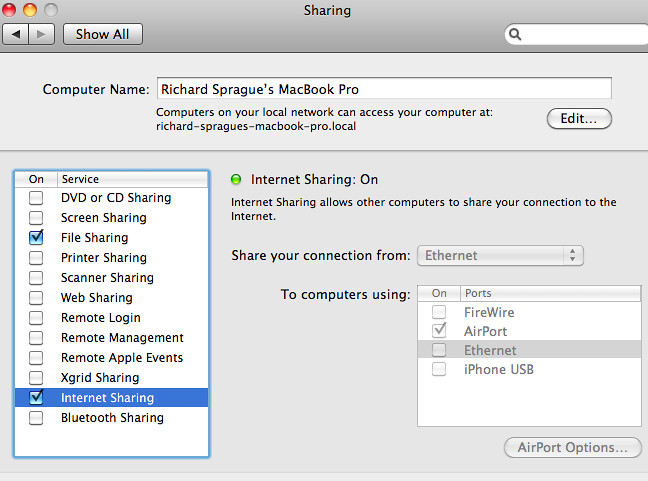
Note: I have file sharing turned on as well, but that's not necessary (and normally it's a good idea to keep it turned off).
Also, remember that you'll have to uncheck the Internet Sharing box before you can select different ways of sharing your connection. You'll want to select "AirPort" to create the WiFi hotspot.